
Staff, PINs & payroll
Who can do what – and getting everyone paid.
Why set staff up at all
PINs are optional and off by default – the register works fine with nobody set up, and plenty of single-operator businesses never turn them on.
The moment you have more than one person ringing, they earn their keep. Every sale gets attributed to whoever rang it, which makes the sales-by-server report real, makes discounts traceable, and makes cash count against a person rather than a shift.
Everything else here builds on that one idea: punches, schedules, tip pools and server banking all key off who was signed in.
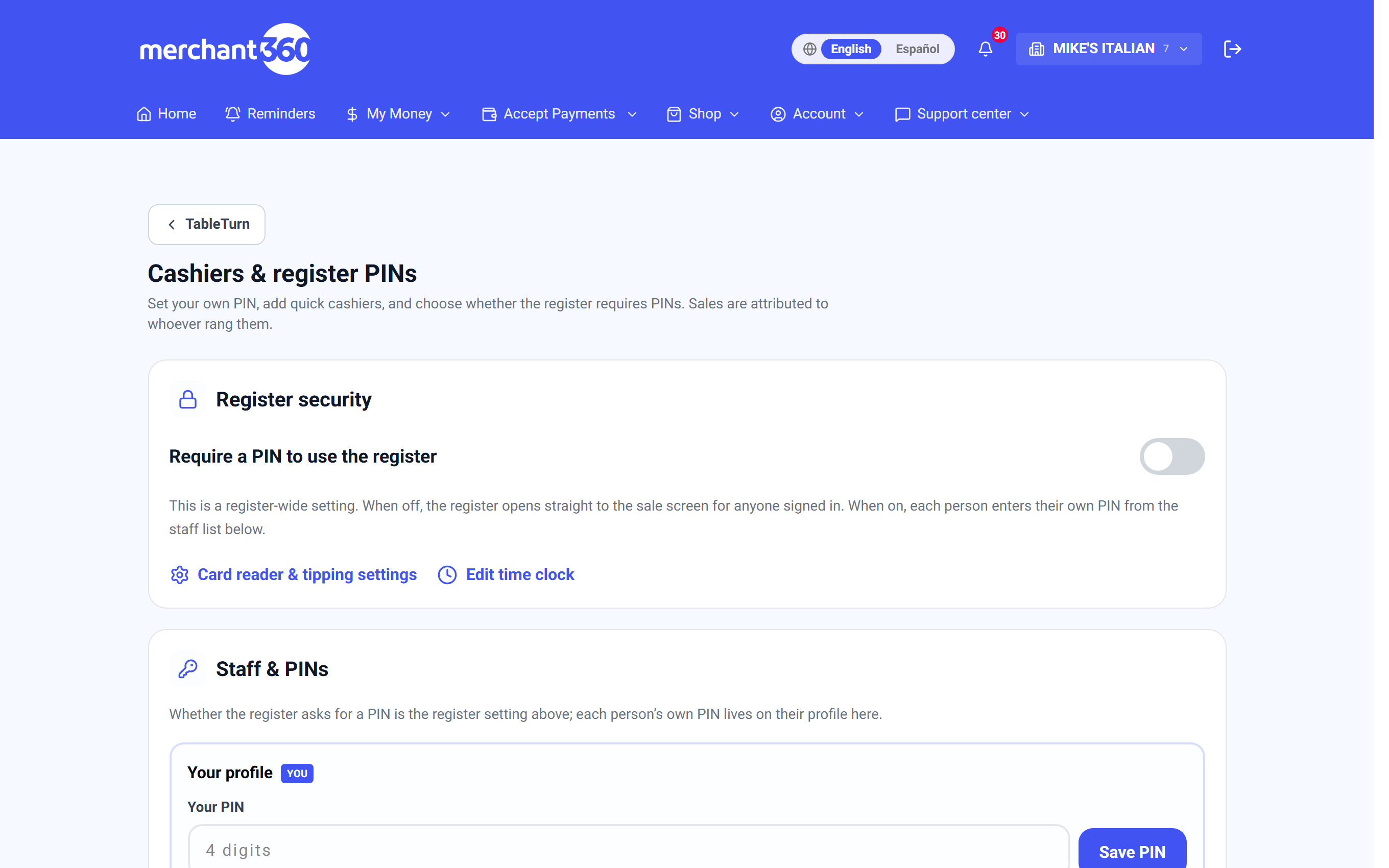
Cashiers and PINs
- 1Turn on Require a PIN to use the register. Until you do, the register opens straight to the sale screen for anyone signed in.
- 2Set your own PIN – four digits. It also closes the full-screen register back to the back office, so it doubles as the exit code.
- 3Add a quick cashier for each employee: a name and a 4-digit PIN. That's the whole setup.
- 4The register now locks between users. Staff tap their PIN to unlock, and Lock signs them straight out again.
You can rename a cashier, reset a PIN, deactivate someone without deleting their history, or remove them entirely. Deactivating is usually what you want when someone leaves – it keeps their past sales attributed.
What each person is allowed to do
Every cashier carries a small set of permissions, toggled on their row.
Manager is the big one and implies the rest – a manager can do everything, and the individual toggles grey out because they're already covered.
Drawer lets them open the cash drawer. Discounts lets them discount and comp. Refunds lets them reverse a sale. Leave all three off and you have someone who can ring and take payment, which is exactly right for a new starter.
Separately, Require a manager PIN for discounts & tax-exempt makes the register ask for a manager's PIN in the moment, rather than blocking the action outright. That's the pattern for a floor where a manager is around but not standing at the till.
There's always an escape hatch: a signed-in owner or manager can open the register **without a PIN** from the lock screen. Nobody gets locked out of their own business by a forgotten code.
The time clock
With the time clock on, staff punch in and out on the register's lock screen – the same screen they already use to unlock. There's no separate app and nothing else to remember.
Punches are what the schedule, payroll and tip pool all draw on, so they're the foundation rather than a nice-to-have.
Managers can edit them. The time-clock page lists recent punches grouped by day with editable clock-in and clock-out times, a manual add-shift form for the ones that got missed, and delete.
**Require counting the drawer before clock-out** ties the two together: a cashier can't punch out until their drawer is counted. It turns "the drawer was short sometime this week" into "the drawer was short on Tuesday night, on Sam's shift".
Hourly wages and labour cost
Each cashier can carry an hourly wage. It isn't used to pay anyone – TableTurn doesn't run payroll – but it's what turns punches into a labour-cost percentage on your reports.
That number is the one worth watching. Sales alone tell you if it was busy; sales against labour tell you whether being busy was worth it.
Building the schedule
The schedule is a week grid: each day lists its shifts with an inline row to add another.
What makes it more than a rota is the footer. Each day forecasts labour cost against projected sales, and the week totals it – so you can see an over-staffed Tuesday while you can still do something about it, rather than in next month's P&L.
Payroll and the tip pool
Payroll & tip pool rolls up a pay period you choose: hours, wages and tips per cashier, straight from the actual punches. Download CSV hands the whole thing to whoever runs your payroll.
The tip pool takes card tips plus auto-gratuity for that period and splits it across everyone who was on the clock.
- 1Pick the pay period.
- 2Choose By hours – proportional to time worked – or Evenly, an equal share each.
- 3Calculate shows the split before anything is committed: each person, their hours, their share.
- 4Record payout commits it. Past runs are listed underneath with their date, method and total.
Calculate first, always. Seeing the split by hours next to the split evenly, in real numbers from a real week, settles the argument about which is fairer faster than any amount of discussion.
Server banking – what each server owes the house
At the end of a shift a server is holding cash that isn't all theirs. Server banking works out exactly what changes hands.
Pick a business day and each server expands to show their shift: cash sales, card sales, tax, cash tips, card tips owed to them, and any cash drops they've made during service.
The line that matters is on the right: Turn in $84.50, House pays $12.00, or Even. That's the whole conversation, already done.
Closing a server out
- 1Enter their declared cash tips. Cash tips are invisible unless someone records them, and this is where that happens.
- 2Enter any tip-out to support – the share going to bussers, bar or kitchen.
- 3Record cash drops as they happen through service, each with an optional note, so a mid-shift drop to the safe isn't a mystery at midnight.
- 4Close them out. The line locks as Closed with a timestamp, their declared tips and their tip-out.
- 5Reopen if something was entered wrong – it's a correction, not a lock-out.
Sales rung with no cashier PIN show as **unassigned** and can't be banked to anyone. If that block is large, PINs aren't being used consistently – which is worth fixing before the money is.
Common questions
The register wants a PIN and nobody knows it. The signed-in owner or manager can open it without one from the lock screen, then reset the PIN under Cashiers.
A sale is attributed to the wrong person. Someone stayed signed in. Lock the register between users, or use the time clock so shifts bound the sessions.
Tips look wrong in payroll. The pool covers card tips and auto-gratuity. Cash tips only appear if they were declared at server checkout.
Someone left. Deactivate rather than delete, so their sales, punches and past payouts stay intact.
A PIN got shared. Reset it – and consider Require an enrolled device for PIN unlock in Devices, which makes a leaked PIN useless anywhere but your own tablets.