
Table Time
Bill by the hour – pool tables, lanes, karaoke rooms, bays.
Selling time instead of things
Everything else in TableTurn sells an item. Table Time sells an hour – pool tables, bowling lanes, karaoke rooms, batting cages, simulator bays, a room by the hour.
You set an hourly rate, start a timer when the guests sit down, and stop it when they leave. The prorated time drops onto the ticket as a line, and it rings up alongside their food and drinks on the same check. There is no separate system and no second payment.
A $20/hour rate run for 50 minutes bills **$16.67** – exact to the minute. Whether it *should* be exact is your call, and that's what the rounding rule is for.
Setting up a rate
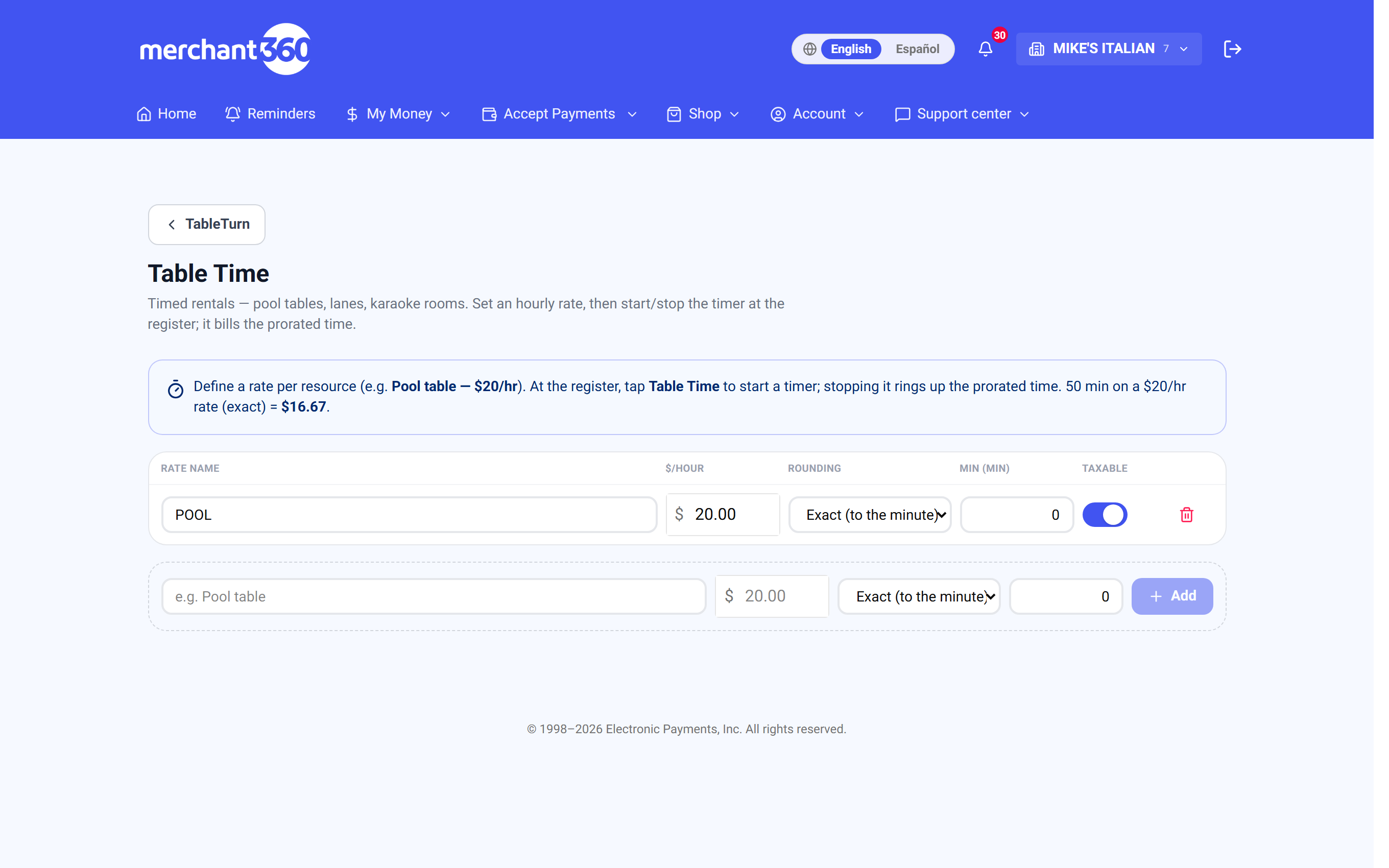
A rate is one bookable resource. Name it the way your staff say it out loud – Pool table, Lane 3, Karaoke room – because that name prints on the guest's check.
- 1Open Table Time in your TableTurn settings.
- 2Enter the rate name and the $/hour.
- 3Pick a rounding rule (below).
- 4Set a minimum in minutes, or leave it at 0 for none.
- 5Leave taxable on unless time genuinely isn't taxed where you are.
- 6Tap Add. The Table Time button appears at the register as soon as one active rate exists.
Rounding – the setting that decides your revenue
Five options, and the difference over a busy weekend is real money.
Exact (to the minute) – the honest one. 50 minutes on $20/hr is $16.67. Guests never feel stung, and it's the easiest to defend at the counter.
Round up to 5 / 15 / 30 minutes – the middle ground. Round up to 15 turns 50 minutes into 60, billed $20.00. Common for lanes and rooms where you're turning a resource and the changeover has a cost.
Round up to the hour – the blunt one. Any part of an hour bills a full hour. Fine when that's the posted, obvious rule; irritating when a guest discovers it at the till.
Whatever you pick, put it on the sign. Rounding is fair when it's known in advance and a nasty surprise when it isn't – the setting is silent, so your signage has to do the talking.
Minimums
A minimum is a floor in minutes. Set 30 and a rental billed for less still charges 30 minutes' worth.
It applies after rounding, so the two work together rather than fighting: with round-up-to-15 and a 30-minute minimum, a 10-minute rental rounds to 15, then floors to 30.
It exists because turning a table has a fixed cost whatever the guest did with it. A five-minute go on a pool table still costs you the rack.
Running a timer
- 1Tap Table Time in the register toolbar and pick a rate.
- 2The timer appears at the top of that ticket and starts counting – the clock ticking every second, the cost climbing with it.
- 3Ring food and drinks onto the same ticket as normal. The timer just sits there accruing.
- 4Tap the timer for its actions: Pause, Resume, Stop & add, Remove.
- 5Stop & add puts the billed amount on the ticket as a line. Take payment as usual.
The guest can see the cost climbing if the customer display is facing them, which does more to keep a rental honest than any amount of asking.
Pausing, and what it's for
Pause banks the time so far and freezes the clock. Resume starts it again from where it stopped.
It's for the things that genuinely aren't the guest's time – the lane goes down, the cue breaks, a group takes a break for food and you'd rather not charge them for eating. Pausing is the difference between a rule and a judgement call, and it lets staff make the judgement call without doing arithmetic.
Remove cancels the timer entirely with no charge, for when it was started in error.
Two guards worth knowing
Timers belong to their ticket. Two pool tables running at once never see each other's clocks, because each timer is scoped to the ticket it was started on. You can work the room normally without losing track.
You cannot check out with a timer still going. The register stops you and points at the timer, whether it's running *or paused* – a paused timer still owes time to the check. This is the guard that stops a rental walking out unbilled, which is the whole failure mode this feature exists to prevent.
If checkout is blocked and you can't see why, look at the top of the ticket. It'll be a timer someone paused and forgot.
Rentals on your reports
Rental revenue reports separately. The Sales Overview carries a Table Time (rentals) block listing each rate with its number of sessions, total minutes and revenue, plus a total.
That separation is what lets you answer the real question: whether the tables earn their floor space, independently of the food and drink they pull in alongside.
Changing a rate later
Rates edit in place. Change the name, the hourly price, the rounding, the minimum or the taxable flag and it saves as you go – there's no Save button and no republish.
A change applies to timers started after it. A rental already running keeps the terms it started on, so putting your weekend price up at 6pm doesn't re-price the table that's been going since five.
The only other control on the row is delete, so a rate you're finished with comes off the register by being removed. Deleting doesn't touch past rentals – they've already been rung onto their checks and stay on your reports.
Seasonal resource? Because there's no on/off switch, the practical move is to delete the rate when it closes and add it back when it opens. Note the price, rounding and minimum somewhere first – it's four fields to retype.